Shift alarm app

A shift alarm app built around the rota.

ShiftFlowr is a shift alarm app for people whose wake-up time cannot stay on the same weekday setting forever. The alarm is tied to your shift pattern, so it moves with the roster: early starts, back shifts, nights, and the leave-home alarm before every one of them.

Free on Android · Early access · Every feature unlocked

Product proof

The alarm surfaces need to be visible, not implied.

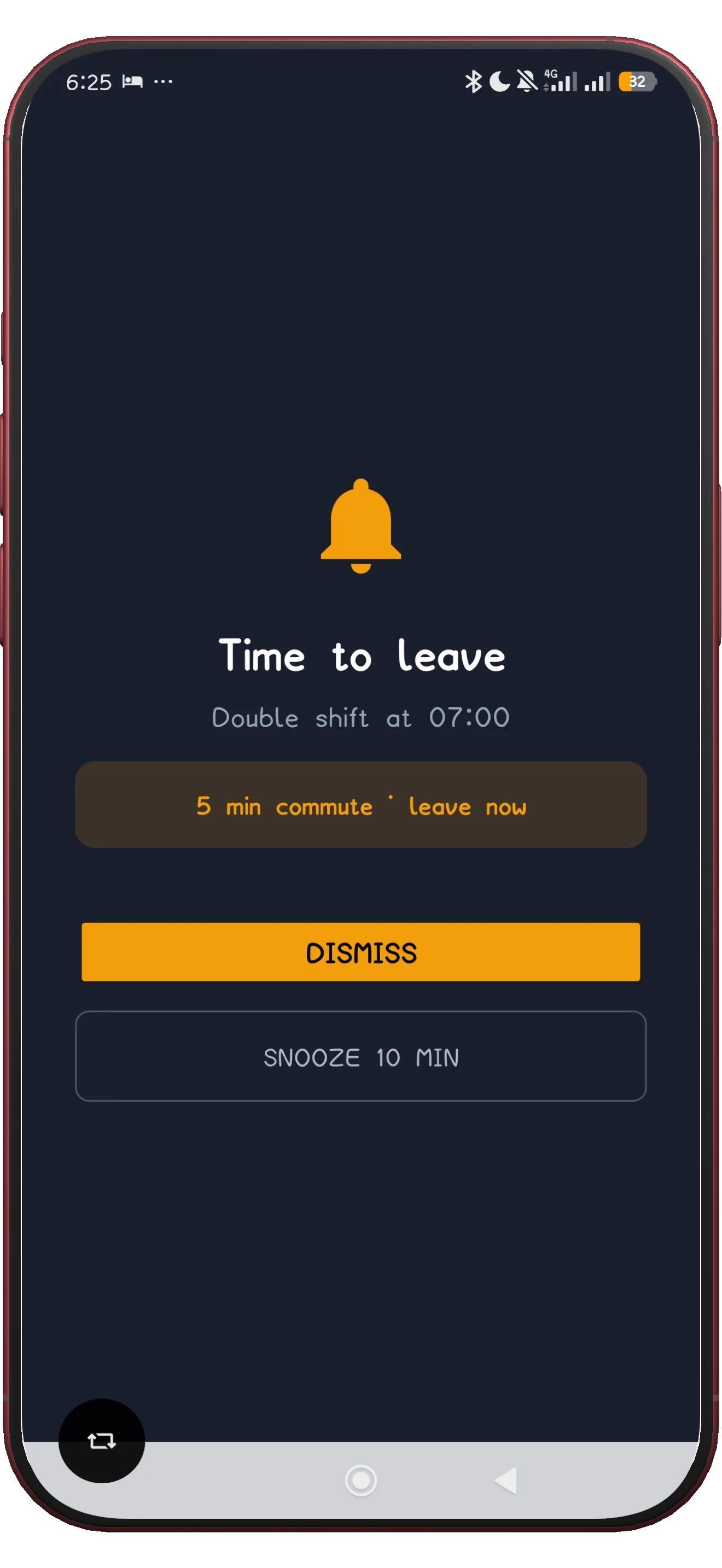
For work-alarm intent, the strongest proof is the actual wake alarm and leave-for-work alert staged cleanly and kept large enough to read. Both fire automatically for every shift in your pattern - nothing to re-set when the roster rotates.
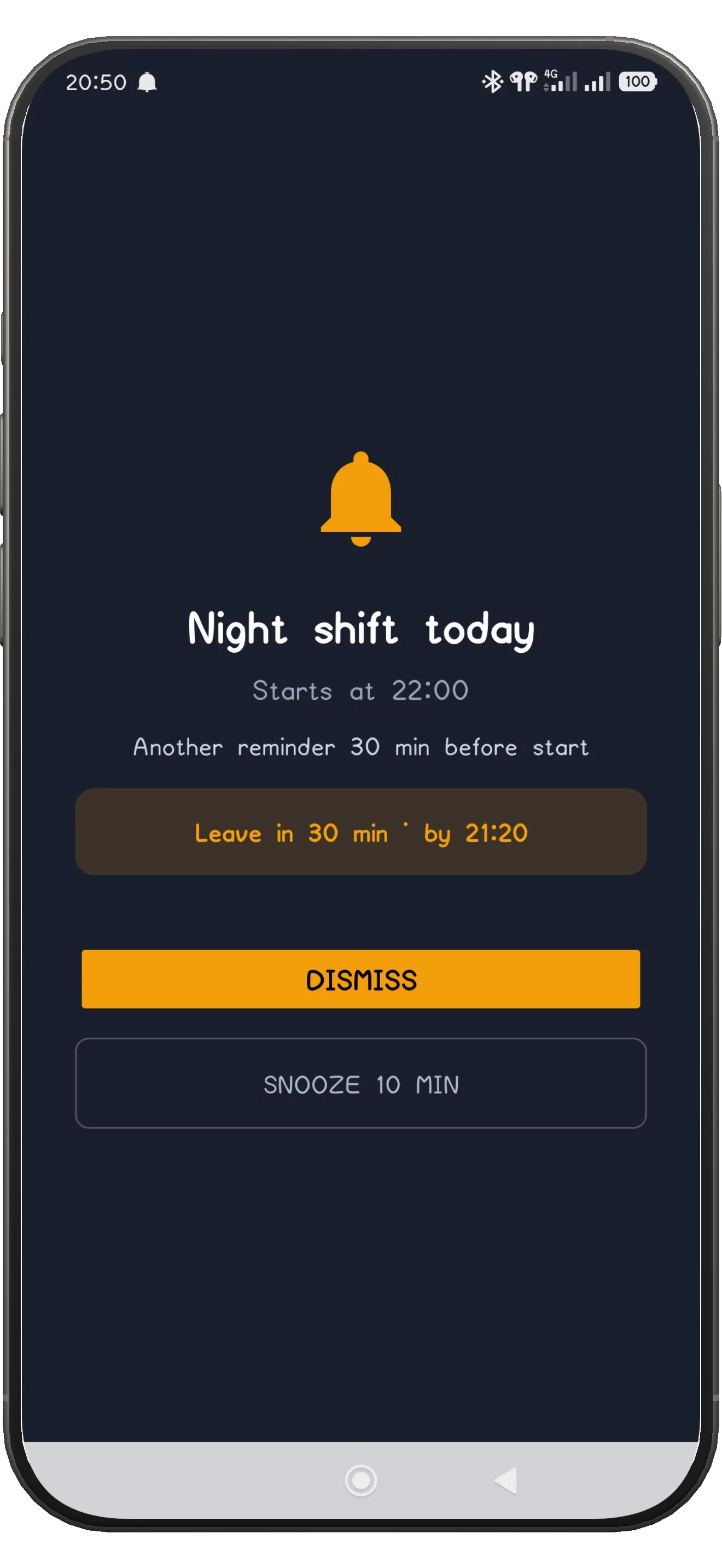
ShiftFlowr wake alarm screen
ShiftFlowr leave-for-work alarm screen

Why it matters

Why a normal alarm clock fails rotating workers

A standard phone alarm repeats on weekdays. A shift worker's week does not. When your roster mixes 6 am starts, 2 pm starts, and nights in the same fortnight, a static alarm is either ringing when you do not need it or silent when you do. That is the gap a work alarm app exists to close.

Shift-aware timing

The alarm changes with the roster instead of relying on one fixed weekday wake-up. Each shift type gets its own alarm time automatically.

Nothing to re-set

Change from earlies to lates to nights and the alarms follow. No Sunday-night ritual of editing five alarms for the week ahead.

Pattern plus alarm

Because ShiftFlowr is also a shift scheduling app, the alarm stays tied to the actual work pattern, not a guess you maintain by hand.

Silent and Do Not Disturb

Rings even when the phone is on silent

On Android, ShiftFlowr's wake-up alarm fires at full volume even if the phone was left on silent or in Do Not Disturb mode, and takes over the screen with the shift name, start time, and what is coming next. If you fell asleep with the phone muted after a night shift, the alarm for your next early still gets through.

This is the feature shift workers ask for most: not a louder alarm, but an alarm that cannot be silently swallowed by a phone setting you forgot about. iPhone support is currently on the waitlist.

Leave-for-work reminders

A second alarm for the door, not the bed

Waking up is only half the problem. ShiftFlowr also fires a leave-home alarm before every shift: set your commute time once, and the alert goes off that many minutes before each start. A 30-minute drive before a 6 am early and a 45-minute bus before a 2 pm back shift are both handled from the same setting - no home or work address needed, no maps integration to configure.

One commute setting

Set it once in minutes. It applies to every shift in the pattern, with an optional early-arrival buffer on top.

Tied to the roster

The reminder knows when your shift starts because the roster is already in the app. It never fires on your rest days.

How it compares

ShiftFlowr vs the alarm you already have

Any alarm app can wake you once. The difference shows up in week three of a rotating pattern, when the manual approach starts slipping.

Phone's built-in alarm Generic alarm app ShiftFlowr
Follows a rotating roster automaticallyNoNoYes
Different alarm time per shift typeManual onlyManual onlyBuilt-in
Fires on silent / Do Not Disturb (Android)Varies by phoneVariesYes
Leave-for-work reminder before each shiftNoNoYes
Knows your rest days (never rings)NoNoYes
Full-screen alert with shift name and start timeNoNoYes
Free for personal useFreeOften paidFree in early access

Every shift type

One work alarm for earlies, lates, nights, and everything between

The wake-up logic works the same way before every shift type, not only the easy ones. If your week depends on not missing an early shift, surviving a run of night shifts, or catching a back shift after a short changeover, the same alarm system covers all of them.

Connected pages

Work alarm plus schedule, not alarm alone

If you only need a plain one-time alarm, any alarm app can do that. The value here is when the wake-up time depends on early shifts, night shifts, mixed rotating cycles, or a repeating rota plan. The alarm is one half of the product; the schedule underneath it is the other half.

Frequently asked questions

Work alarm app - questions answered

What is a shift alarm app?
A shift alarm app connects the wake-up time to your rotating work schedule. ShiftFlowr gives each early, late, night, or back shift the right alarm automatically, instead of making you rebuild weekday alarms by hand.
What is a work alarm app?
An alarm app designed around job schedules, especially rotating shifts, instead of static weekday wake-up times. The alarm timing follows your roster - the rota, in UK workplace slang - rather than a fixed weekly repeat.
Why is ShiftFlowr different from a normal alarm clock app?
Because the alarm timing moves with your roster instead of relying on the same repeated manual alarm every week. A 6 am early start and a 2 pm back shift each get the right wake-up without you touching anything.
Does the alarm work when my phone is on silent or Do Not Disturb?
Yes, on Android. The wake-up alarm fires at full volume even if the phone was left on silent or in Do Not Disturb mode, and shows a full-screen alert with the shift name and start time. iPhone support is currently on the waitlist.
What is a leave-for-work alarm?
A second alert, separate from the wake-up alarm, that tells you when to head out the door. You set your commute time once, and the alarm fires that many minutes before each shift starts - no home or work address needed.
Does it work for night shifts and early shifts?
Yes. Every shift type gets its own alarm timing: early, late, night, back shift, and on call. When your roster rotates, the alarm rotates with it.
Does ShiftFlowr also plan the shifts?
Yes. It combines schedule planning with work alarms, leave-home alarms, and shift-aware timing. You set your pattern once and the calendar fills itself for months ahead, with alarms attached.
Is the work alarm free?
Yes. ShiftFlowr is completely free on Android during early access, with every feature unlocked. Paid plans will be introduced later with plenty of notice for existing users.

Let the alarm follow the schedule.

ShiftFlowr keeps the roster and the wake-up logic in one place. Set the pattern once - the alarms set themselves.

Get it on Google Play

Free on Android · Early access · Every feature unlocked