ShiftFlowr app icon

Stop rebuilding your shift schedule every month.

Set your shift pattern once, check the month clearly, and change only what changed.

ShiftFlowr is built for nurses, carers, security workers, warehouse teams and anyone whose work schedule changes. Choose from 11 preset patterns, fill months in seconds, and know what you'll earn before payday.

Made for preset patterns, irregular schedules, and last-minute changes — in the shift language your workplace actually uses.

Free on Android · Early access  ·  iOS coming soon

ShiftFlowr monthly calendar screen

Speaks your shift language

It feels like it was built for your workplace

Generic calendars give you a dropdown of "Day / Night / Other." ShiftFlowr reads your phone's timezone — on the device itself, nothing is uploaded — and shows you the exact words used on your work schedule. You pick the ones you actually say.

🇬🇧 UK — Early, Late, Nights, Back Shift, Annual Leave

Common UK hospital terms: Earlies, Lates, Nights, S/L, RD, CPD, Bleep Cover. The app picks up UK timezones (including Ireland, Jersey, Guernsey, Isle of Man) on your device.

🇺🇸 US — Swing, Graveyard, PTO, 2nd/3rd Shift

American shift vocabulary: Swing Shift, Graveyard, PTO, Comp Day, Personal Day, Sick Day.

🇦🇺 AU — Arvo, RDO, Recreation Leave

Australian shift vocabulary: Arvo (afternoon shift), RDO / Rostered Day Off, Recreation Leave, Annual Leave, Personal Leave. ShiftFlowr works as a shift roster app in Australia.

🇳🇿 NZ — Annual Leave, Holiday, Day Off

New Zealand vocabulary: Morning / Afternoon shifts, Annual Leave, Holiday, Sick Leave, Day Off. ShiftFlowr detects NZ timezones and shows the right terms automatically.

🇨🇦 Canada — Stat Holiday, PTO, Vacation

Canadian shift vocabulary: Morning / Afternoon / Evening shifts, PTO, Vacation, Stat Holiday, PD Day, Sick Day. All auto-detected from your timezone.

🌐

Your region, picked up automatically

Read from your phone's timezone — on your device, never uploaded. Override it anytime.

Shift vocabulary by region

What do you call your shifts?

The same shift has a dozen names depending on where you work. ShiftFlowr knows them all — and uses the ones your workplace actually uses.

Shift type 🇬🇧 UK 🇺🇸 US 🇨🇦 Canada 🇦🇺 Australia 🇳🇿 New Zealand
Morning / early Early, Earlies Morning, AM Shift Morning, AM Shift Morning, Early Morning, Early
Afternoon / late Late, Lates Swing, Swing Shift Afternoon, Evening Arvo, Afternoon Afternoon, Evening
UK back shift Back Shift, Back UK only UK only UK only UK only
Night shift Night, Nights Graveyard, Night Night, Nights Night, Arvo Night Night, Night Duty
On call On Call, Bleep Cover On Call, Call Back On Call, Standby On Call, Call Out On Call, Call Out
Annual leave Annual Leave, Holiday, AL PTO, Vacation Vacation, PTO, Stat Holiday Annual Leave, Recreation Leave Annual Leave, Holiday
Sick day Sick Leave, S/L Sick Day, Personal Day Sick Day, Personal Day Sick Leave, Personal Leave Sick Leave, Personal Leave
Rest day / RDO Rest Day, RD, Day Off Day Off Day Off RDO, Rostered Day Off Day Off

ShiftFlowr auto-detects your region from your timezone and pre-selects the right terms — you can override any label in Settings.

11 preset patterns

Pick a pattern and fill months in seconds

Every preset is based on a real-world shift pattern. Tap one, choose a start date, and ShiftFlowr fills your calendar — skipping any shifts you've already entered.

📅

One-tap apply

Choose pattern, pick start date. Done. ShiftFlowr fills your calendar and skips any dates already set.

🔁

Custom builder

Irregular shifts? Tap to add, edit or swap — done in seconds.

📲

Calendar sync

Push your shifts to Google Calendar. See your work schedule alongside everything else in your life.

For shift workers

Built for the people who keep everything running

If your week looks different every week, ShiftFlowr was made for you.

🏥 Nurses & healthcare 🔒 Security guards ✈️ FIFO workers 🚒 Fire & emergency 🏭 Manufacturing 🚇 Transport & logistics 🛒 Retail & hospitality 👮 Police & corrections

How it works

Set up in three steps. Done in under a minute.

1

Pick your pattern

Choose from 11 preset patterns — 4-on-4-off, Panama, DuPont, NHS 3-week, and more — or build your own.

2

Choose a start date

Tell ShiftFlowr when your current cycle started. It fills months automatically from that anchor.

3

See what you earn

Enter your hourly rate and ShiftFlowr shows your projected pay — daily, weekly, and monthly — including overtime and night uplifts.

Key features

Everything a shift worker actually needs

Reminders & alarms

From 24-hour advance notice to a full-screen alarm up to 1 hour before (timed to your commute), a smart leave-home alert, and a handover reminder before your shift ends — ShiftFlowr keeps you covered at every stage. Every alert is optional and configurable independently.

📋

Upcoming shifts at a glance

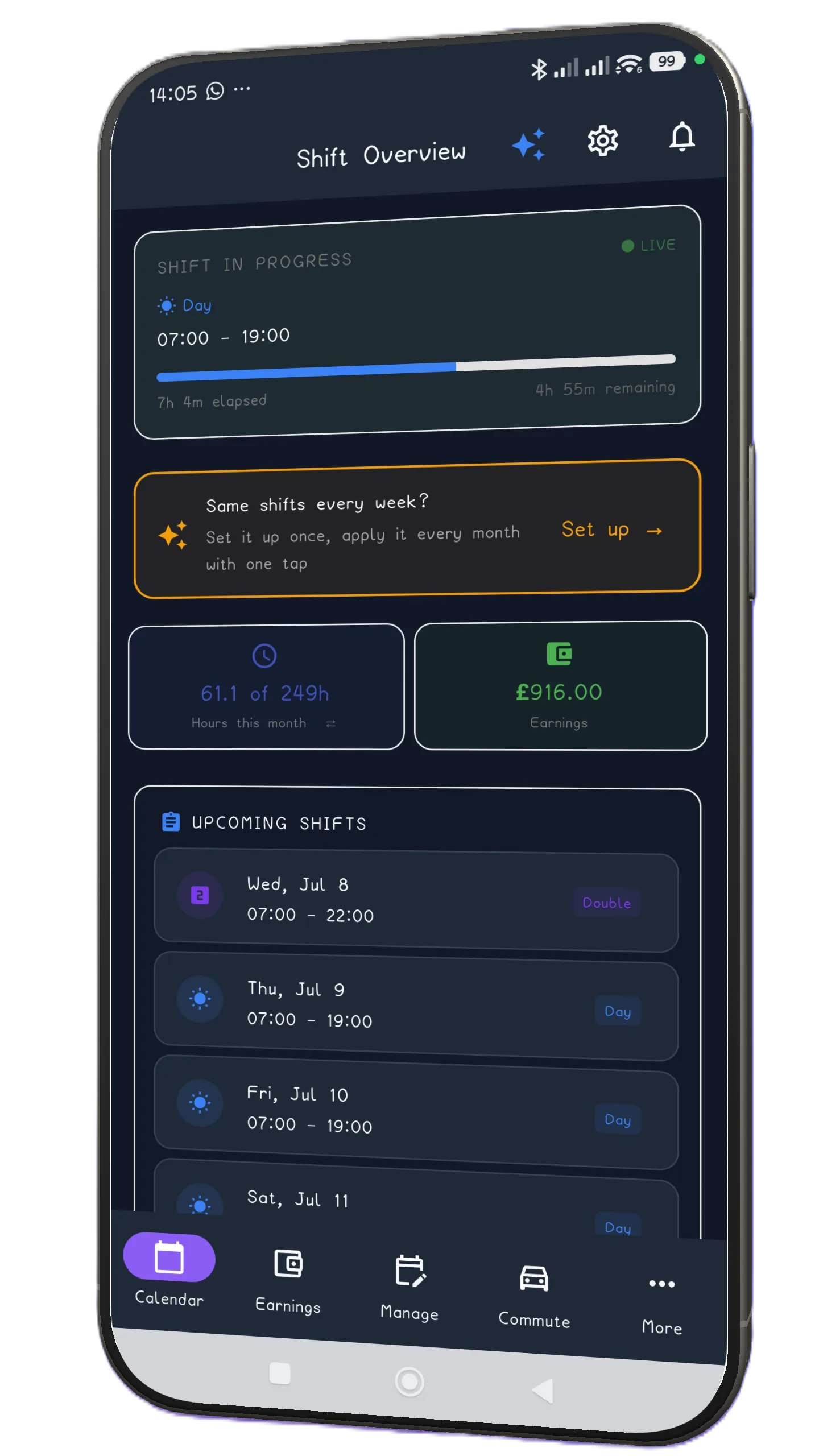
Your home screen shows your next shifts the moment you open the app — shift name, start time, and how long until you're on. No digging through calendars.

💰

Earnings calculator

Set your hourly rate, night uplifts, and weekend premiums. ShiftFlowr calculates gross pay, estimated take-home, National Insurance, and Income Tax — so you know your actual earnings before payday.

☁️

Cloud backup

Sign-in is optional. Use ShiftFlowr locally without an account, or sign in to back up your shifts, restore them on a new device, and keep subscription access in sync.

🌐

Region-aware language

Auto-detects UK, US, Canada, Australia, or New Zealand. Shows the shift names your workplace actually uses.

🔁

Pattern builder

Build your shift pattern once, then apply it every month in a single tap. 11 presets plus a custom builder — existing shifts are never overwritten.

🚗

Commute reminders

Set your commute time — ShiftFlowr tells you exactly when to leave so you arrive on time. No address or postcode ever collected.

🏖️

Annual leave tracker

Track your holiday allowance right from the app. See remaining days or hours, updated automatically every time you mark a day off.

📊

Projected income

See what you're on track to earn across the full year — based on your actual shifts and pay rate. Gross pay, estimated take-home, NI, and Income Tax.

Smart timing

Every notification, exactly when you need it

ShiftFlowr wraps every shift in a sequence of smart alerts. Turn any one off independently — just keep at least one active.

🔔
24 hours before Notification

Early heads-up so you can plan your rest, meals, and day before your next shift.

Smart shift alarm Full-screen alarm

A full-screen alarm that rings until you dismiss or snooze it, timed automatically to give you exactly enough time to get ready and leave — based on your commute setting.

🚶
Leave-home alert Smart · commute-based

Fires at the exact time you need to walk out the door — calculated from the commute duration you set. No address or postcode ever needed.

📳
30 minutes before Notification

A final nudge as your shift approaches — in case you needed it.

Shift starts

You're on. ShiftFlowr shows a live progress card on your home screen so you always know how far through you are.

🤝
1 hour before shift ends Handover reminder

Time to wrap up, brief your colleague, and hand over on time. Built for nurses, care workers, and anyone with a structured handover.

All alerts are optional and configurable independently in Settings. You must keep at least one active. No address, postcode, or location data is ever collected.

Pricing

Free during early access. Pro comes later.

ShiftFlowr is in early access: everything below — including every Pro feature — is currently free for everyone. This is the pricing planned for later, and early users will get plenty of notice before anything changes.

Free forever

£0

  • Up to 19 shifts
  • 1 saved pattern
  • All 11 preset patterns
  • Region-aware shift names
  • Wake-up alarm
Get on Google Play
MOST POPULAR

Pro

£3.99/mo

or £16.99/year (save 65%)

Local pricing shown at checkout. Prices vary by region.

  • Unlimited shifts
  • Unlimited saved patterns
  • Custom pattern builder
  • Calendar sync
  • Earnings calculator
  • Cloud backup & sync
Get on Google Play

Free during early access

FAQ

Common questions

Does ShiftFlowr work offline?
Yes. All your shifts, templates, and settings live on your device. You can add, edit, and view shifts without a connection. Cloud backup syncs when you're back online.
Will ShiftFlowr overwrite my existing shifts?
Never. When you apply a pattern, the app checks every date first and skips any day that already has a shift. Your manually-entered shifts are always safe.
Which shift terms does ShiftFlowr use? Can I change them?
The app auto-detects your region from your timezone and shows local terminology for UK, US, Canada, Australia, New Zealand, or universal English. You pick the exact words you use and can change them anytime in Settings.
Is my data private?
You can use ShiftFlowr without signing in. If you choose to sign in, your shift data is stored in your personal Firebase account for backup, restore, cross-device sync, and subscription-state sync. It is never sold or shared.
Is ShiftFlowr free?
ShiftFlowr is free on Android during early access - every feature unlocked. Paid plans come later, with plenty of notice for early users.

On a break? Stressed at work?

Play Late For Shift — free, right in your browser

Your shift starts at 7:00. One tap to fly, dodge the doors, clock in on time. Made by us, for the same people ShiftFlowr is for.

TOP WORKER SO FAR: 25 — CAN YOU BEAT IT?

▶ Play now — no install

Works on your phone. 30-second rounds — perfect for a break room.

Coming soon

iOS & iPhone — join the waitlist

ShiftFlowr is live on Android. An iPhone app is in development. Leave your email and we'll tell you the moment it lands on the App Store.